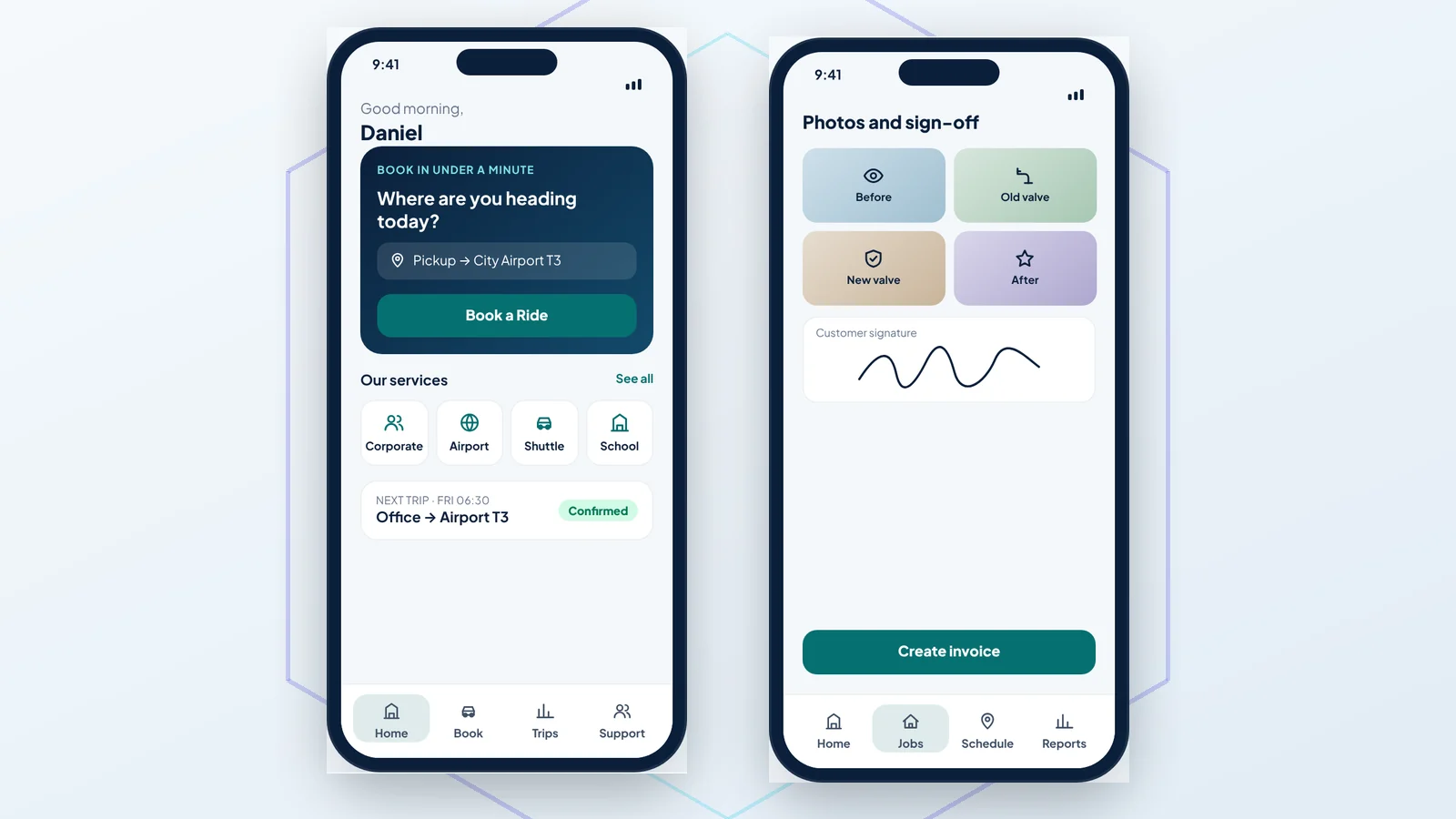
Why app prices online are so confusing
Most cost guides are written by large agencies building apps for funded start-ups: social networks, marketplaces and Uber-style platforms with thousands of users on day one. Their numbers are real for those projects, but they say little about what a roofer, a café, a clinic or a transport company needs. A small business app usually has one clear job: take bookings, run jobs, take orders or replace paperwork. That job, not the word "app", decides the price.
The fair way to think about it is screens and roles. How many screens does the app need, and how many different people use it: only customers, or customers plus staff plus an office admin? Every extra role adds its own screens, rules and testing.
What drives the cost of an app
- Number of screens. A focused app with 6 to 8 screens is a very different project from one with 25.
- Roles. A customer app alone is simpler than a customer app plus a driver or technician app plus a web admin panel.
- Accounts and data. Sign-in, user profiles, history and permissions take time to build securely.
- Maps and live location. Address search is quick; live driver tracking on a customer's map is more work.
- Payments. Taking money in the app means a payment gateway, receipts, refunds and edge cases.
- Connections to other tools. Accounting software, Google Sheets, email and WhatsApp links each add a little.
- Design. A clean design in your brand is part of every project; heavy custom animation is not usually needed.
What does not change the price much: whether you want Android or iPhone. With a cross-platform framework such as Flutter, one codebase produces both apps, so you are not paying twice.
Our fixed prices, and what each one buys
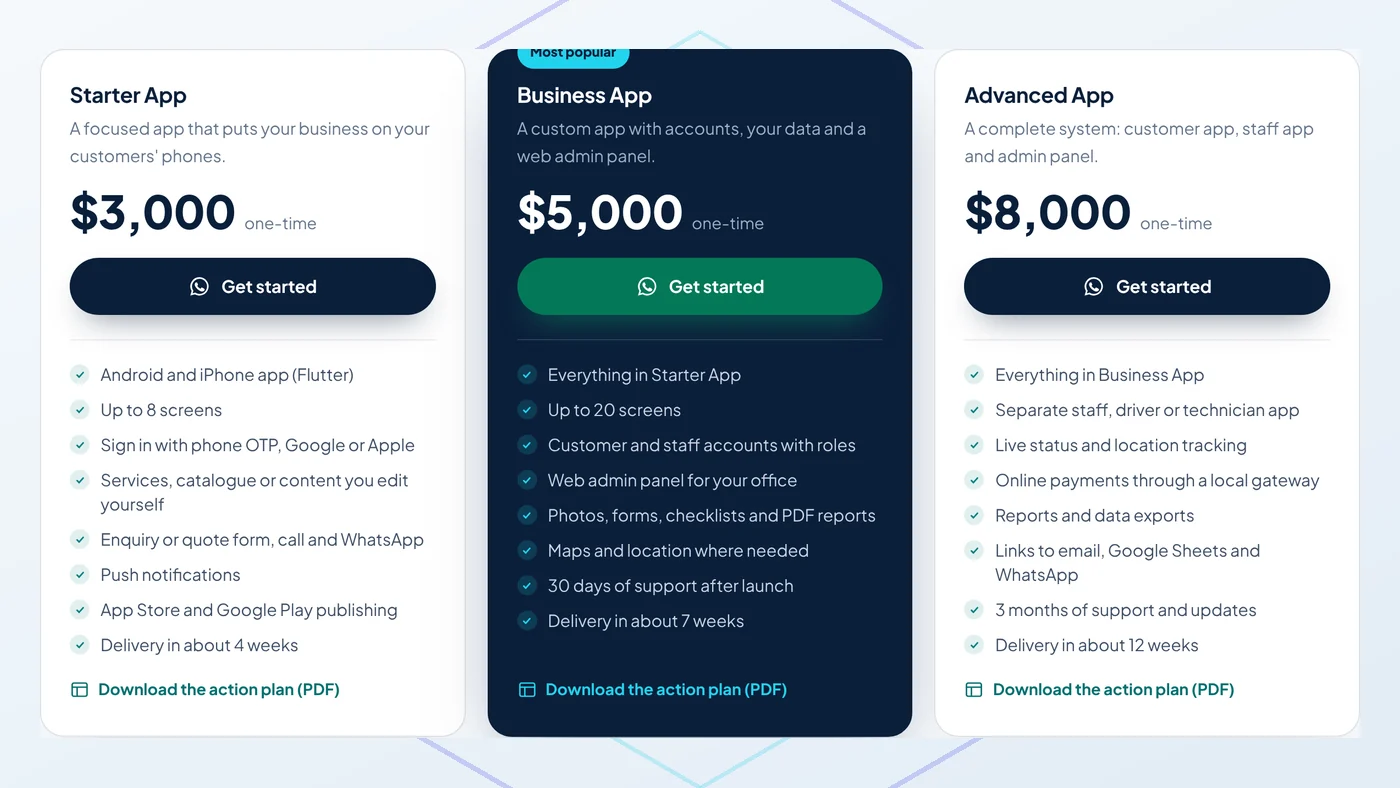
We publish our prices because small businesses deserve a straight answer. All three are one-time project prices in US dollars:
- Starter App, $3,000: an Android and iPhone app with up to 8 screens, sign-in, your services or catalogue, an enquiry or quote form, push notifications and publishing on both stores. Delivery in about 4 weeks.
- Business App, $5,000: up to 20 screens, customer and staff accounts with roles, a web admin panel, photos, forms, checklists and PDF reports, maps where needed and 30 days of support. Delivery in about 7 weeks.
- Advanced App, $8,000: a separate staff, driver or technician app, live status and location tracking, online payments, reports and exports, links to email, Google Sheets and WhatsApp, and 3 months of support. Delivery in about 12 weeks.
Booking apps for transport companies have their own plans from $5,000, because the fare calculator, driver app and dispatch panel are a known package. You can see all of them on our app development pricing.
Running costs after launch
The build is a one-time cost, but every app has a few running costs. Be wary of any quote that leaves them out:
- Store accounts. Google Play charges a one-time $25 registration fee and the Apple Developer Program costs $99 a year. Both accounts should be in your company's name.
- Servers. Small business apps built on Firebase often stay within the free tier or cost a few dollars a month at the start, and grow with usage. You pay Google directly, so there is no mark-up.
- Maps and SMS. Map searches and phone-number sign-in codes have usage-based fees once you pass the free allowances.
- Payment fees. If customers pay in the app, the payment gateway takes its card fee on each transaction.
- Updates. Apple and Google release new phone software every year. Plan for occasional updates, either as monthly support or small one-off jobs.
How to keep the budget under control
The biggest saving is deciding what the first version does not need. Launch with the screens that save the most time or bring in the most money, then add the rest once real customers use it. A transport company might launch with booking and a fare calculator and add the driver app three months later. A plumber might start with jobs and photos and add invoicing next.
Ask for a screen plan before you pay anything. A good developer lists every screen, every role and every feature with a fixed price, so there are no surprises in week six.
Custom app or monthly software?
Monthly software is cheaper to start, and for some businesses it is the right answer. A custom app makes more sense when the software forces you to work its way instead of yours, when per-user fees keep growing as you hire, or when you want customers to book and pay under your own brand. We compare both honestly in our guide to custom apps versus off-the-shelf software.
Frequently asked questions
Is it cheaper to build only for Android?
Not much. With Flutter one codebase produces both the Android and iPhone apps, so most of the work is shared. The extra cost of iPhone is mainly the Apple account and the App Store review.
How are payments for the project made?
Our app projects are paid in three milestones: 40% to start, 30% when you approve the working test version and 30% when the app is live on the app stores.
Who owns the app?
You do. The app is published under your own store accounts, runs in your own Firebase project, and the full source code is handed over at the end.
Can I see an example before deciding?
Yes. Each of our app pages has an animated demo showing the main screens from start to finish.
Get a fixed price for your app
Tell us what you want customers or staff to do in the app, and we will reply with a screen plan, a fixed price and a timeline, free of charge. Start on our app development page or message us from the contact page.
Related articles
 Taxi booking app development cost for small fleets and transport companiesWhat a taxi or transport booking app costs a small fleet: customer app, driver app and dispatch panel, key fea…
 A local SEO checklist for roofing companiesA practical local SEO checklist for roofers: Business Profile, town pages, reviews, citations and tracking, in…
 Lost Google rankings? Why your website dropped, and how to recoverLost Google rankings? The common causes of sudden drops (updates, technical errors, spam, thin content, lost l…
Want us to check this on your own site? Ask for a free audit and we'll send the first fixes we'd make.